Keyboard hotkey, Keyboard shortcut, keyboard
commands, hotkey utility

AgataSoft home page

Programs by AgataSoft:
 

click to enlarge

download

buy


Tired of opening frequently launched programs using desktop shortcuts or by navigating the Programs menu?

Assign hotkeys to the programs you use most often!
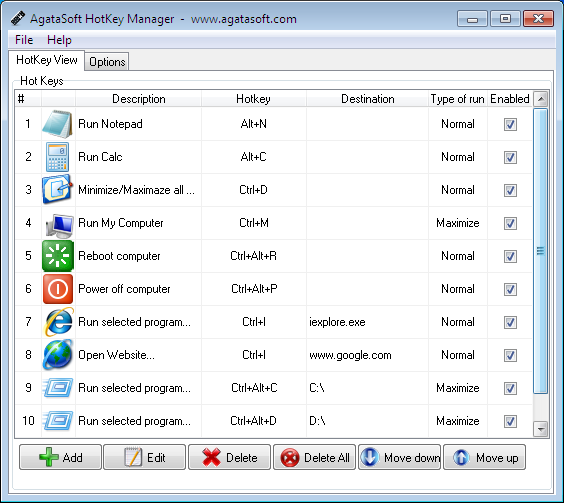
It's easy - just use AgataSoft HotKey Manager.

AgataSoft HotKey Manager is a hotkey manager for Windows.

With this program, you can easily assign keyboard shortcuts to your frequently run programs. You can also do the following with AgataSoft HotKey Manager:
Assign a hotkey to the «Open My Computer» action.
Assign a hotkey to the «Open My Documents» action.
Assign a hotkey to the «Launch Calculator» action.
Assign a hotkey to the «Launch Notepad» action.
Assign a hotkey to the «Open a command prompt» action.
Assign a hotkey to the «Power off computer» action.
Assign a hotkey to the «Restart computer» action.
Assign a hotkey to the «Hibernate» action.
Assign a hotkey to start the selected program.
And other actions.

Some key features of AgataSoft HotKey Manager:

Easily assign keyboard shortcuts to your programs.

Assign keyboard hotkeys to your frequently visited websites.

Use a hotkey to open a specific drive.

Assign a hotkey to open/close your CD-ROM

Close the selected program using a hotkey.


for Windows 98, 2000, 2003, XP, Vista, Seven

buy


Keywords for search machines:

keyboard hot key manager, hotkeys on keyboard, pc keyboard hotkey, Assign hotkey, Keyboard hotkey, Keyboard shortcut, keyboard commands, hotkey utility, windows keyboard hotkey, xp keyboard hotkey, hotkey on keyboard, hotkeys for keyboard

AgataSoft Shutdown Pro

Click to Enlarge 

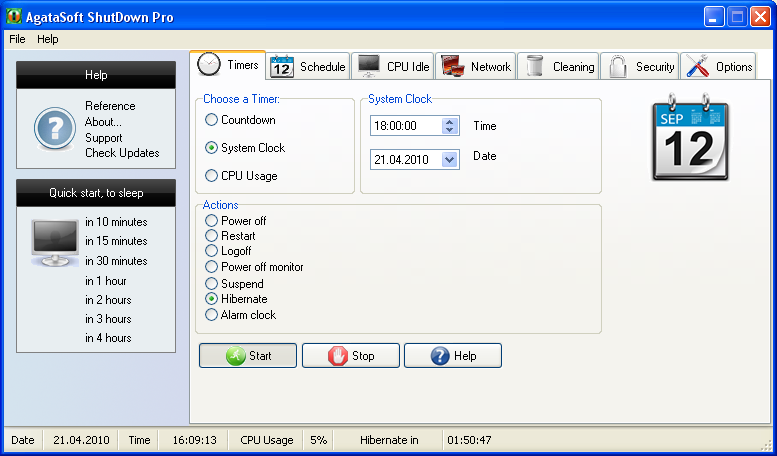
Do you know how to shut down computer at specified time? How to shut down computer in certain time? How to shut down computer if CPU is inactive? How to shut down Remote computer?
AgataSoft ShutDown Pro can help you to answer that all questions


© 2005-2010 AgataSoft.
All Rights Reserved.